
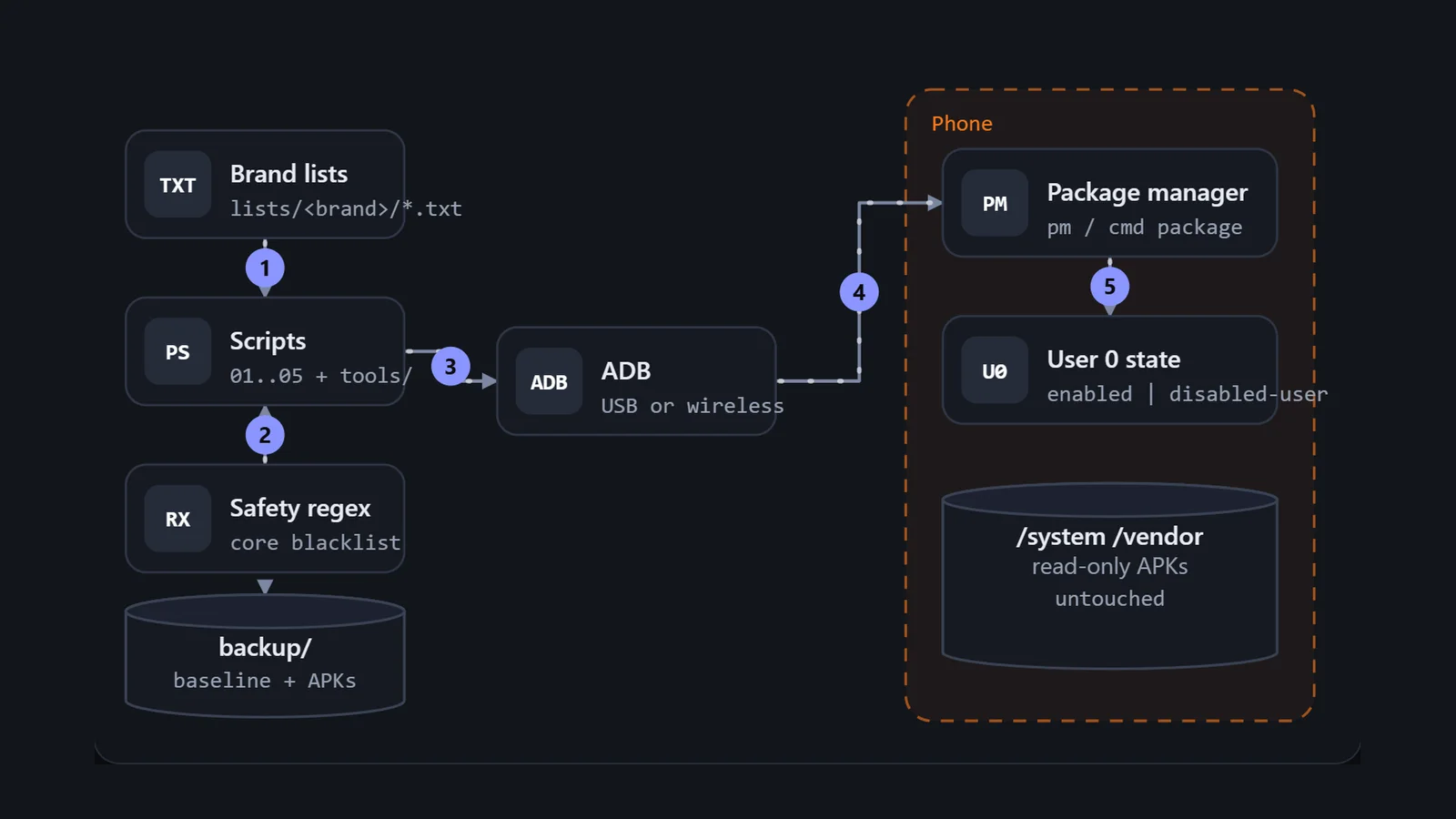
My Oppo Reno8 5G shipped with 547 packages and 10.90 GB free on a 106 GB partition. A store I never opened was pushing notifications, a lock screen magazine was fetching sponsored wallpapers, and vendor diagnostic daemons were logging my usage. Factory reset puts all of it back, and rooting breaks banking apps. This post is about the third option, a zero-root debloat that runs from a laptop over ADB, and about the decisions that make it safe to run on a phone you actually use: why I disable instead of uninstall, how the scripts recognise a brand, how a dry run and a baseline make every change reversible, and how the package lists are organised and vetted.
Understand the problem#
Commercial firmware ships vendor storefronts, lock screen magazines, a home-screen feed, diagnostic loggers and pre-exempted background services. Some of these are mild annoyances. A few move data off the phone. All of them hold RAM, wake the CPU and take storage.
Functional requirements#
- Disable or remove vendor apps, ad services and telemetry daemons without root.
- Pick the right package list for the phone automatically, across brands that share code and brands that do not.
- Never touch a package whose removal could break boot, calls, unlock or emergency services.
- Preview a run without changing anything.
- Return the phone to its exact starting state on request.
- Recover storage and reduce background work, and report what changed.
Non-functional requirements#
- No root, no unlocked bootloader. Banking apps and OTA updates must keep working.
- Reversible. The way back is saved before the first change.
- Conservative. A package with no evidence of safety stays untouched.
- Cross-platform. Windows PowerShell for the main phases, Python and shell for macOS and Linux.
- Observable. Every action prints what it did and what the phone said back.
- Version-tolerant. A list entry that does not exist on this build is skipped, not an error.
Phone <-- ADB --> scripts
scripts read lists//*.txt
change = per-user flag on a package
still needed: baseline, brand pick, safety rules, undo
The set-up#
Core entities#
There are only five things: a package (a reverse-domain name such as com.heytap.market), a list (a text file of packages with comments), a brand profile (which lists apply to a phone), a baseline (the saved state of every package) and a session (one run, with its restore script).
The interface#
The commands, in the order a first-time user runs them:
.\scripts\01-backup-baseline.ps1               # snapshot + sideloaded APKs
python tools/check.py lists/oppo/coloros-safe-debloat.txt
tools/disable.sh --dry-run lists/oppo/coloros-safe-debloat.txt
.\scripts\02-debloat.ps1 -Brand auto [-IncludeOptional]
.\scripts\03-optimize-battery.ps1                # doze, standby buckets
.\scripts\04-restore.ps1                         # replay the baseline
.\scripts\05-storage-report.ps1                  # HTML storage dashboard
The data model#
State is plain text: three baseline files and one list per brand and tier. There is no database.
Build it one requirement at a time#
1. Take a baseline before touching anything#
The first script dumps three views of the package manager: everything for user 0, everything enabled, and everything disabled. It also records free space on the data partition and pulls the APKs of anything installed outside the Play Store, because a sideloaded app that is later removed cannot be reinstalled from the system image.
- The script checks that exactly one device is attached and authorised.
- It lists packages for user 0, then the enabled subset, then the disabled subset.
- It captures
df -k /dataso a later report can show recovered space. - It lists third-party packages with their installer and pulls the base APK of those installed by hand or from a browser.
2. Detect the brand and choose lists#
Oppo, Realme and modern OnePlus share the ColorOS base, so their package prefixes overlap (com.heytap.*, com.coloros.*, com.oplus.*), while vivo and iQOO share BBK code. The script reads ro.product.brand and ro.product.manufacturer, lowercases both and matches on a substring. A table then maps each brand to a safe list and an optional list.
if     ($rawBrand -match "oppo"    -or $rawManufacturer -match "oppo")    { $Brand = "oppo" }
elseif ($rawBrand -match "oneplus" -or $rawManufacturer -match "oneplus") { $Brand = "oneplus" }
elseif ($rawBrand -match "realme"  -or $rawManufacturer -match "realme")  { $Brand = "realme" }
elseif ($rawBrand -match "vivo"    -or $rawManufacturer -match "vivo")    { $Brand = "vivo" }
elseif ($rawBrand -match "iqoo")                                           { $Brand = "iqoo" }
A separate Python inspector reads OS-specific properties for display, such as ro.build.version.opporom for ColorOS, ro.vivo.os.version for Funtouch and OriginOS, ro.oxygen.version and ro.build.version.realmeui. The shell tools also fall back through pm disable-user, then pm disable, then pm hide, because older builds lack the first.
3. Decide what is safe#
A package gets into a safe list only if two independent community databases agree. The rule is deliberately lopsided toward caution: if either flags it, it moves to optional; if neither knows it, it is left alone. A hard-coded regex sits underneath all of that as the last line of defence.
The regex rejects android, SystemUI, Settings, the phone and dialer stacks, the keyguard, the permission controller and package installer, the telephony and media providers, and the Qualcomm and MediaTek telephony services. The list validator, the PowerShell debloat script and the shell script each apply it, and the Python tools carry copies too. That duplication is a cost, and I come back to it below.
4. Disable, with a fallback#
Applying a list is a loop over names. Names not installed on this build are skipped. The disable function tries pm disable-user --user 0 and checks the reply for "new state"; if that fails it tries pm disable, then pm hide. Each attempt prints the phone's own reply, so a refusal is visible rather than swallowed.
5. Undo#
The restore script does set arithmetic. It reads the baseline, lists what is installed now, and reinstalls anything that was installed before and is missing now with cmd package install-existing, falling back to a saved APK if that fails. It then re-enables anything that is currently disabled but was enabled and not disabled in the baseline. The packages the vendor had disabled before I started stay disabled.
Deep dive: why disable instead of uninstall#
pm uninstall -k --user 0 marks the package as not installed for the user and keeps its data. pm disable-user --user 0 keeps the package installed and registered, but disabled. From outside the two look identical: no icon, no process. The difference is how the rest of the system treats a missing name. Code that looks up a package it expects to exist can get an exception on the uninstalled one and a clean "disabled" answer on the disabled one.
Uninstall everything for user 0
It reads as the thorough option, and on some builds it works. It is also the version where a hidden dependency shows up as a crash in a different app. It is only undone by reinstalling, which needs the original install path to be intact.
Uninstall, and fall back to disable when refused
This is what my main debloat script does. Modern ColorOS and Realme UI refuse pm uninstall on some packages with DELETE_FAILED_INTERNAL_ERROR, and vivo can raise a SecurityException, so a fallback is needed anyway.
Disable first; uninstall only for third-party apps
One command that works on both modern and older builds, one inverse (pm enable), and the package keeps existing in the registry. For frozen OEM apps that refuse even disable, pm suspend is the next step I used in the lab.
Deep dive: dry run and the safety gates#
The shell and PowerShell tools run the same gates in the same order. They validate each name against the package-name syntax, which catches BOM and CRLF contamination from Windows editors. They compare every name to the core regex and refuse the whole list if one matches, rather than skipping it. They write a timestamped backup folder with the installed and disabled lists and the device properties, and they generate a restore script, appending one line per package as it is processed. With --dry-run they stop right before the real command and print what would have happened.
The lab version of this, which I used to test on my own phone before writing the project, goes further: a single-package script does a preflight (path, installed for user 0, current state, counts of declared services and receivers), disables, verifies by re-listing, and appends a transaction record with a five-point checklist for telephony, fingerprint, camera, push notifications and system UI. I ran one package at a time and checked, instead of applying a hundred at once.
Deep dive: per-category package lists#
The lists are organised on three axes. The directory is the brand. The file is a tier, safe or optional. Inside the file, comment headers split packages by what they do, so a reader can delete a whole block by intent. In the ColorOS safe list those blocks are brand app and theme stores, lock screen magazines and global search, brand cloud apps and accounts, and diagnostics. The optional list holds apps that are fine to remove only if the user has an alternative: weather, sound recorder, compass, phone clone.
- Storefronts and theme stores.
com.heytap.market,com.heytap.themestore: promotional pushes and in-app purchases. - Lock screen magazines.
com.heytap.pictorialand the Glance service: sponsored wallpapers fetched over mobile data. - Diagnostics.
com.oplus.logkit,com.oplus.onetrace: logging and event tracing. - Meta preloads.
com.facebook.servicesand siblings: background daemons shipped in firmware. - Google ad and analytics modules. The AdServices and on-device personalisation packages, in the universal telemetry list.
Three shared lists apply to every brand: third-party bloat, Google telemetry and Facebook preloads. Two more exist, carrier bloat and a universal tracking list, but the main script does not load them; they are meant for the shell and Python tools. The same package often has two or three names across OS generations, which is why entries come in groups such as com.heytap.pictorial, com.coloros.pictorial and com.oplus.pictorial. The skip-if-absent rule is what makes that safe.
Deep dive: stopping the background drain#
Disabling packages is only one lever. The battery script handles three others. It removes pre-exempted packages from the Doze whitelist with dumpsys deviceidle whitelist. It places social and short-video apps in the restricted standby bucket, number 45, so they stop running in the background while still launching normally. And it disables the Google feed package behind the minus-one screen and restarts the launcher. For ads and trackers inside apps it recommends Private DNS with a filtering resolver, which works at the DNS layer without a VPN slot.
The final design#
One run, one rollback#
- Connect the phone, authorise ADB, and run the baseline script to capture package state and sideloaded APKs.
- Validate the chosen list, then dry-run it and read the skips.
- Apply the safe list; add the optional list only for apps you have replacements for.
- Apply the battery and standby changes and set Private DNS.
- Reboot, check calls, camera, fingerprint and notifications.
- If something is wrong, run the single-package restore, or the baseline restore for everything.
What I would change#
- Make the main script disable first, to match the documentation and the lab finding about the accessory framework.
- Add a dry-run switch to the main PowerShell script. Only the shell and PowerShell tools in
tools/have one. - Run the restore steps unconditionally. The generated restore line is a chain joined by
||:install-existingfirst, thenpm enableonly if it fails. A chain stops at the first command that exits zero, sopm enablemay never run. My lab restore script runs unsuspend, enable and install-existing one after another instead. - Stop defaulting unknown brands to the Oppo profile; abort instead. Also match iQOO before vivo, because the vivo test also looks at the manufacturer string.
- Keep one copy of the core regex. It is pasted into several scripts and tools and has to be edited in each.
- Report where recovered storage came from. The benchmark of 24.46 GB mixes cache trims, removed third-party apps and package changes, and the README does not split them.
Test yourself#
Why does pm disable-user --user 0 need no root?
- It edits /system directly with ADB privileges.
- It only changes the per-user package state; the APK on the system partition is untouched.
- It unlocks the bootloader first.
- It runs as the SystemUI package.
What happened when the accessory framework package was fully uninstalled on ColorOS 14?
- The phone bootlooped.
- Another service threw NameNotFoundException; reinstalling it and disabling it for user 0 fixed the crash.
- Nothing; it was fine.
- The Play Store stopped working.
A package appears in only one of the two upstream lists and is rated safe there. What does the consensus rule do?
- Removes it.
- Removes it only because that one list rates it safe.
- Leaves it untouched always.
- Moves it to the core regex.
Why does restore compare the live phone with the baseline instead of replaying a log?
- Logs are too large.
- State comparison works whichever script made the change and even if the session log is lost.
- ADB cannot write logs.
- The baseline is encrypted.
Why might the generated restore line fail to re-enable a disabled package?
- Disabled packages cannot be restored.
- The
||chain stops at the first command that succeeds, sopm enablemay never run. - ADB is read only.
- The package is in the core regex.
Which part of the 24.46 GB recovery comes from disabling system packages?
- All of it.
- None directly: disabling frees no space in the read-only partition; the gain comes from caches and removed third-party apps.
- Half of it.
- Only the games.