
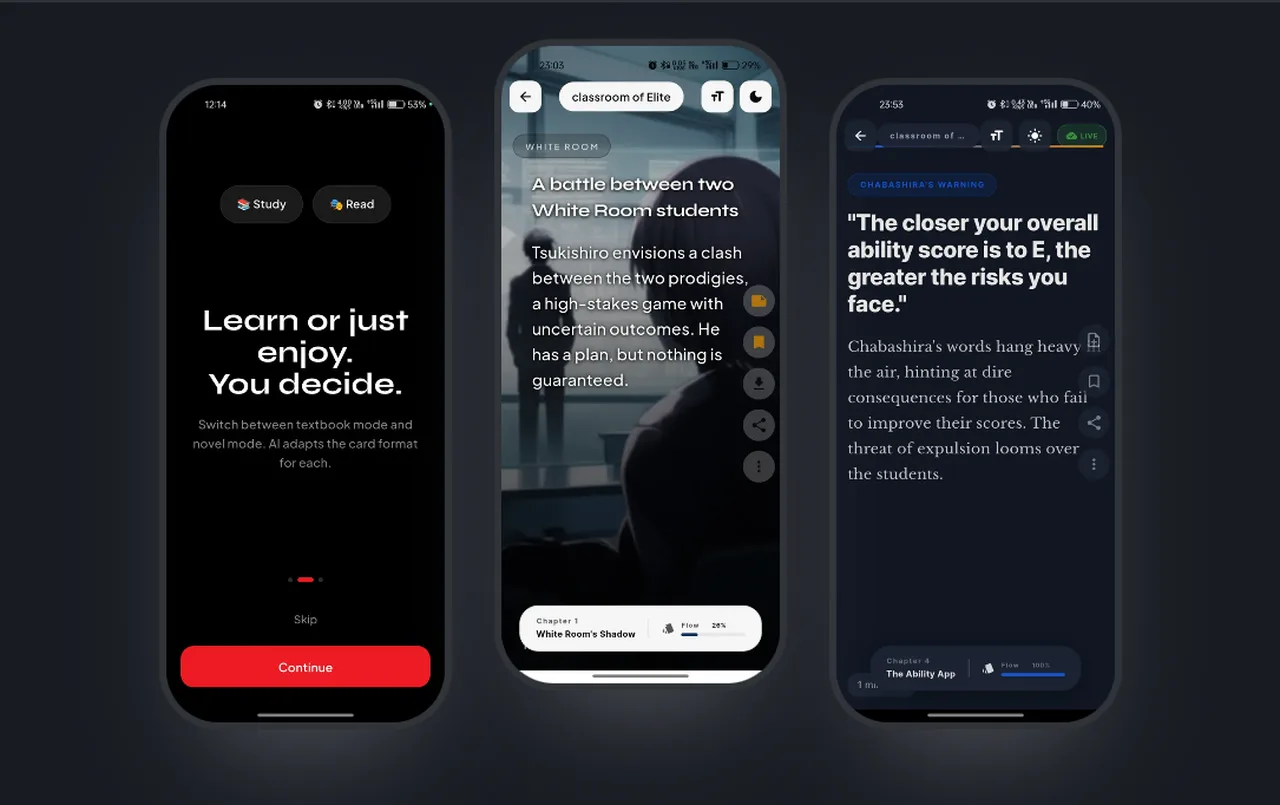
FlashBook turns a book or PDF into a vertical feed of short, swipeable cards, the way a short-video app works. Each card has a headline, a few sentences and sometimes a generated picture, and your place in the book follows you between phones. I built it as a Flutter app on top of a serverless AWS backend, and this post walks that backend one requirement at a time: sign-in, a PDF upload that never touches a function, the summary call that costs money, pictures, and the notes and progress that make it resumable. It also covers the places where it is still wrong.
The board below is everything the backend is made of. I will keep coming back to it, one piece at a time.
health, has no stores and is left off. Names are shortened from the template; memory and timeout are the template values.One request, end to end#
The request that matters most is opening a chapter. It crosses every layer: the app, the gateway, the token check, the cache, the model and back. Everything else in the system exists to make this one call possible, cheap or repeatable.
generate_summary.py and the app's chapter loader; the 13 second spacing and the 15,000 character trim are constants in book_provider.dart.The app does not send a whole book. It splits the extracted text into chunks of about 5,000 characters, never fewer than 2,000 unless it is the last, and keeps at most 15 of them. Each chunk becomes a chapter. That keeps every model prompt small enough to finish inside the 29 second ceiling and keeps the number of model calls per book bounded.
Understand the problem#
I wanted a way to read a long PDF without it feeling like homework. The first version was a Flutter client with a FastAPI backend that I ran on my laptop. The version I took through the AWS-backed AI for Bharat hackathon rounds replaced that backend with the serverless stack in this post, and the FastAPI code stayed in the repo for local work.
Functional requirements#
- A user can sign up, verify an email, sign in and stay signed in.
- A user can upload a PDF and see it in a library.
- The system turns a chapter of text into a short run of cards.
- Some cards carry a generated picture.
- A user can bookmark, take notes and resume at the same card on another device.
Non-functional requirements#
- Safe by default. A route someone forgets to think about must require a login, not allow anyone.
- Large files stay off the API. API Gateway and Lambda both have request payload limits far below a textbook PDF.
- Bounded model cost. The same text should never be summarised twice in a day, and one chapter should never produce an unbounded number of calls.
- Degrade, do not break. A model failure or a cache failure must still leave the reader with something to swipe.
- Finish inside 29 seconds. That is the API Gateway integration timeout, so every function has to answer within it.
- Resumable. Position and pictures must restore on a device that has never seen the book.
Requirements: sign in, upload, cards, pictures, notes + progress
Hard limits : 29 s per call, 15-minute upload URL, 24 h cache
Nothing built yet. Next: the entities and the interface.
The set-up#
Core entities#
The backend names five things: a user, a book, a note, a PDF and an image. A book belongs to a user and points at one PDF. Chapters and cards are shaped by the model's answer and cached as one JSON document per chapter, so the backend never stores a card as its own row.
The interface#
The API is a plain REST surface. The auth routes and health are public. Everything else carries a Bearer token.
Public (Authorizer: NONE)
GET    /health
POST   /auth/signup      /auth/verify      /auth/login      /auth/refresh

Protected (Cognito authorizer by default)
POST   /books/upload                 -> { book_id, upload_url, s3_key }
POST   /books/{book_id}/confirm      -> { total_pages, status: "ready" }
GET    /books                        -> { books: [...] }
PUT    /books/{book_id}/progress     -> chapter, block, percent, image_urls
DELETE /books/{book_id}
POST   /extractText                  { s3_key, start_page, page_count }
POST   /generateSummary              { text_chunk, book_id, chapter_title, mode }
POST   /generateImage                { prompt, style, book_title }
GET    /notes/   /notes/book/{id}    POST /notes/create
PUT    /notes/{id}     DELETE /notes/{id}
The data model#
State is split by access pattern. The slides table is a pure cache and expires on its own. The user-books table is the library and the reading position. The notes table has a secondary index on the book. A second, 89-line template hosts the Flutter web build on S3 behind CloudFront; it is separate from the API stack.
user_id, the cache is a point read by book and hash, and notes are a point read by id or a query on the book_id-index index. All three are on-demand billing.Build it one requirement at a time#
Each board below keeps what the earlier ones built in grey and lights up the new parts. The numbers on the edges match the list under each board.
Requirement 1: sign in#
Cognito does the credential work and the auth function is a thin wrapper around it: sign_up, confirm_sign_up and initiate_auth with USER_PASSWORD_AUTH for login and REFRESH_TOKEN_AUTH for renewal. The password policy asks for eight characters, a lowercase letter and a number. Instead of attaching an authorizer to each route, I set it as the API default and opted the public routes out, so a route I forget is protected, not open.
Auth:
  DefaultAuthorizer: CognitoAuthorizer
  AddDefaultAuthorizerToCorsPreflight: false
  Authorizers:
    CognitoAuthorizer:
UserPoolArn: !GetAtt CognitoUserPool.Arn- The app posts email and password to
/auth/login. - The route has
Authorizer: NONE, so the gateway forwards it to the auth function. - The function calls Cognito and returns an ID token, an access token and a refresh token.
The app keeps the tokens in SharedPreferences and, on launch, calls /auth/refresh with the stored refresh token to restore a session. Later requests send the ID token as a Bearer header and the gateway validates it before any function runs.
Requirement 2: upload a PDF#
A function that receives a whole PDF through the gateway is slow and expensive, so POST /books/upload does not take the file. It creates a row with status uploading and returns a presigned S3 PUT URL. The app uploads straight to S3, then calls /books/{id}/confirm, where the function reads the object back and counts pages with pypdf. Every key is namespaced by user id: users/{user_id}/books/{book_id}/{filename}.
- The app asks the gateway for an upload.
- The gateway routes it to the books function.
- The function writes the book row and returns the signed URL.
- The app puts the bytes straight into the PDF bucket.
- On confirm, the function reads the object, counts pages and flips the status to
ready.
Requirement 3: turn text into cards#
Two functions share the work. extractText reads a page range from S3 (start_page and a default page_count of 50) and returns text plus a has_more flag, so a big book is read in batches. generateSummary turns one chunk into cards.
- The app asks for a page range of text.
- The extract function reads that range from the PDF bucket.
- The app sends one chunk to the summary function.
- The function reads or writes the slides table by book and hash.
- On a miss it asks Gemini for JSON.
The prompt is one narrator persona that asks for five to eight slides of types like scene, reveal, emotion, insight, quote and visual. The API has a mode field (chapter, concept or law) that changes one instruction line, but the app always sends chapter. The Study and Read chips on the onboarding screen are copy only and are not wired to anything.
Requirement 4: pictures on some cards#
The summary marks at most two blocks per chapter with an image_prompt. The app then calls /generateImage for those blocks. The function asks a Gemini image model for a picture, writes the PNG to the image bucket under generated/{uuid}.png and returns a presigned GET URL valid for seven days. The app waits for the first chapter's pictures before it opens the feed, then generates later chapters' pictures in the background with a short pause between calls.
- The app sends the prompt, a style and the book title.
- The function asks the Gemini image model for a picture and decodes the inline bytes.
- It writes the PNG to the image bucket and returns a presigned URL.
Here is what the result looks like in the app, on real phone screenshots.
slide_title, the progress pill is the chapter flow bar, and the picture appears only on blocks the model flagged for one.Requirement 5: notes and progress#
Progress is a PUT /books/{id}/progress that stores the chapter index, block index, percent, extraction status and a map of block id to image URL. That last field is what lets a second phone show the same pictures without regenerating them. Notes have their own function and table: create, read, update, delete and a list by book. The app's notes screen still stores notes locally in SharedPreferences, so this backend is built but not yet connected.
PUT /books/{id}/progress on the books function (3, 4), which also stores the map of block id to image URL.- The app posts or edits a note.
- The notes function writes one item keyed by note id.
- As the reader moves, the app puts progress to the books route.
- The function updates the book row, including the image URL map.
Deep dives#
Deep dive 1: presigned uploads and one signed header#
Post the file through the API
Send multipart form data to a function. It works for a one-page test and fails on a real book, because both API Gateway and Lambda cap the request body. The repo still has this path in extract_text.py, with a hand-written multipart parser because Python 3.13 removed the cgi module, but the app no longer uses it for uploads.
Presign a PUT that includes the content type
The file skips the function, which is right. But if ContentType is part of the signed parameters, S3 requires the client to send exactly that value. The app sends application/pdf, and any mismatch with what was signed came back as SignatureDoesNotMatch.
Presign a bare PUT against a pinned regional endpoint
Sign only the bucket and key, and build the S3 client with an explicit regional endpoint_url so the URL points at the right region and the client never meets a 307 redirect. The app's upload code also follows a 301, 302 or 307 by hand, up to five attempts, because Dart's http client does not resend the body when it follows a redirect on a PUT.
flashbook-user-books moves from uploading to ready only after the page count succeeds.Deep dive 2: caching the expensive call#
No cache
Every swipe back into a chapter regenerates it, which costs money and returns different cards each time, so the feed shifts under the reader.
Cache by book and chapter number
Cheap to compute, but wrong if the same chapter slot ever holds different text, for example after a re-upload. You would serve stale cards for the wrong text.
Cache by a hash of the text itself
The key is a SHA-256 of the exact text, first 32 hex characters, paired with the book id. Different text means a different key, so there is nothing to invalidate. Rows carry expires_at 24 hours ahead and the table's TTL setting deletes them. Cache reads and writes are wrapped in try/except that logs a warning, so a DynamoDB problem makes the request slower and pricier, not broken.
Deep dive 3: making model output safe to render#
Trust the schema in the prompt
Call json.loads on the raw text. A stray code fence, a truncated response or a ninth block and the feed throws or grows without bound.
Ask for JSON mode and parse once
Setting response_mime_type to application/json removes most of the problems, and I do set it. It does not cap the number of blocks or the number of image prompts, and it does not help when the text is cut off at the token limit.
Parse defensively and cap everything the UI multiplies
Strip fences, parse, slice to eight blocks, and let only the first two image hints through, with defaults for every field. Anything that raises sends the reader to a two-card fallback that quotes the chapter's first 300 characters.
Deep dive 4: living inside a rate limit#
Summarise the whole book on upload
Fifteen calls back to back hit the rate limit, the user stares at a spinner, and most chapters are never read.
Summarise on demand, one chapter at a time
Nothing is wasted, but every chapter turn waits for the model. The reader feels each call.
A window: open chapter 1, prefetch the next two
The app awaits chapter 1 and its pictures so the first impression is complete, then fills the next two in the background with a minimum 13 seconds between calls. A server-side queue with its own rate limiter would be better, because today the limit lives only in the client.
Deep dive 5: errors that never reach your code#
Set CORS headers in each Lambda
Every function in this repo does, through a shared CORS dictionary. It covers responses a function returns. It does nothing for a 401 from the authorizer or a 429 or 5xx from the gateway.
Enable CORS on the API
The Cors block on the API answers preflight and adds headers to integration responses. A gateway-generated error is a different response type and still goes out bare.
Add gateway responses for the default error types
Define AWS::ApiGateway::GatewayResponse resources for DEFAULT_4XX and DEFAULT_5XX with the allow-origin, allow-headers and allow-methods set. Also keep AddDefaultAuthorizerToCorsPreflight: false, because a browser sends preflight with no token and the authorizer would reject it.
GatewayResponse for DEFAULT_4XX can add the headers and let the app read the real status.The final design#
Here is the whole board again, used by one reader opening a book on a phone that has never seen it. Every number is a request the app makes in the first few seconds.
- The app starts and finds a stored refresh token.
- It posts the token to
/auth/refreshthrough the open route. - The auth function exchanges it with Cognito for fresh tokens.
- The app calls
GET /bookswith the new ID token. - The books function queries by
user_idand returns each book's chapter, block and image URL map. - The app resends the current chapter's text to the summary function.
- The slides table returns the cards if they are less than a day old; otherwise Gemini regenerates them.
- The app loads each picture from its stored presigned URL, as long as the seven days have not passed.
What I would change#
- Scope notes by user. A note item has no
user_id. Any signed-in user can read, edit or delete a note if they know its id, and the list-all route scans the whole table. The notes need the Cognitosubin the key and in every query. - Do not fall back to "anonymous". The books and notes functions return the user id
anonymouswhen the authorizer claims are missing. A missing claim should be a 401, not a shared bucket of data. - Meter the model on the server. A per-user quota, or a queue with a rate limiter in front of Gemini, replaces the 13 second delay that only the client enforces.
- Widen the cache key. Hash the text together with the mode and the model name, so a prompt or model change cannot serve old cards.
- Move secrets out of the environment. The Gemini key is a
NoEchoparameter copied into every function's environment, and the app's tokens sit in SharedPreferences. Secrets Manager for the two functions that need the key, and the keystore on the phone, are smaller blast radii. - Retire the dual backend and fix the design doc. The FastAPI path and the Lambda path implement the same contract and will drift, and
design.mdstill describes Bedrock, Titan, Redis and CloudFront. The shipped app calls Gemini.
Test yourself#
Why does /books/upload return a URL instead of accepting the PDF?
- Lambda cannot read S3.
- API Gateway and Lambda cap request sizes, and a presigned URL lets the app write straight to S3 while the function only records the book.
- Cognito requires files to be signed.
- DynamoDB cannot store file names.
Uploads fail with SignatureDoesNotMatch after you add ContentType to the presign parameters. Why?
- The URL expired.
- The bucket is in the wrong region.
- The content type becomes a signed header, and the client must send exactly that header.
- S3 rejects PDF files.
Params is part of the signature. Signing only bucket and key leaves the client free to send any content type.What makes the summary cache key safe against serving the wrong cards after a re-upload?
- It is a hash of the chapter text, so different text gives a different key.
- It uses the chapter number.
- It expires after 30 days.
- It is stored in S3.
A request is rejected by the Cognito authorizer and the browser reports a CORS error. What fixes the diagnosis?
- Raise the Lambda timeout.
- Add CORS headers inside the summary function.
- Remove the authorizer.
- Add gateway responses for DEFAULT_4XX and DEFAULT_5XX that carry the CORS headers.
What is wrong with how notes are stored today?
- They are encrypted twice.
- The note item has no user id, so any signed-in user who knows an id can read or change it.
- They are kept in S3.
- They expire after 24 hours.
note_id and the list route scans the table. Notes need the Cognito sub in the key and every query.